Latest WACUP public preview for x86 & x64 is build #24360 (April 20th 2026) (x86 & x64 changelogs)
Latest restricted WACUP beta release is build #24360 (April 20th 2026) (x86 & x64 changelogs)

Show Posts

This section allows you to view all posts made by this member. Note that you can only see posts made in areas you currently have access to.


Messages - Resident_Stevil

Pages: [1]
1
Resolved Issues / Re: [CHANGES MADE] CPro MMD3 won't load
« on: July 03, 2025, 06:23:51 AM »
Still not 100% perfect but at least it's not freezing anymore.

2
Resolved Issues / Re: CPro MMD3 won't load
« on: June 26, 2025, 05:29:15 AM »
The new beta that just went up should resolve problems with that option being enabled. The fix is based on looking at the skin.xml which also caught one cpro skin for me that didn't have the cpro prefix along with showing that the Skins page list wasn't working correctly with it also enabled. With the option off then it's just going to be looking at the file / folder name & files it can see if not already extracted.
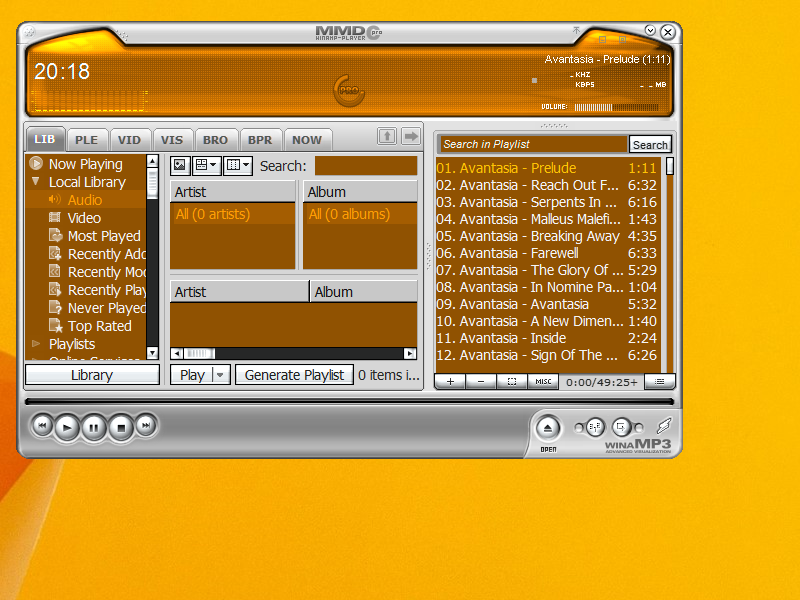
So this fix will come with the next public release?  I don't have access to beta versions.

3
Resolved Issues / Re: CPro MMD3 won't load
« on: June 19, 2025, 06:57:48 PM »
Sorry I didn't reply sooner.  https://winampheritage.com/skin/cpro-mmd/221721  That's the skin I'm referring to.  I appreciate your help.

4
Resolved Issues / [CHANGES MADE] CPro MMD3 won't load
« on: June 16, 2025, 11:45:41 PM »
I'm trying to set my skin for WACUP to the CPro MMD3 skin, but for some reason when I do the window disappears and then the program locks up.  I have to delete the skin file to reset to the default skin in order to get WACUP to work normally again.  Does anybody have a fix for this?


Pages: [1]