Latest WACUP public preview for x86 & x64 is build #25464 (November 6th 2026) (x86 & x64 changelogs)
Latest restricted WACUP beta release is build #25464 (November 6th 2026) (x86 & x64 changelogs)

Recent Posts

Pages: [1] 2 3 ... 10
1
Visualisations / ALIAS
« Last post by LegoBlasterAgent on Today at 03:45:15 AM »
Credit to VISBOT and ALIAS this on AVS pack.
2
Thanks! I didn't know. 8)
3
Fomalhaut 1.3.1 is out – just a small update:

  • Compact Cassette: titles in Chinese, Japanese, Korean, Cyrillic, Greek and other scripts now appear on the cassette label – characters missing from the built-in fonts are taken from the system fonts.
  • Atari Video Music: when the device changes its setting itself (next / previous effect, effect changes, presets), the front panel and the preferences now show the new setting.
  • 70s three-head deck: the needles of the peak meters keep their length at every deflection, like on the original.
Download: vis_fomalhaut-1.3.1.zip on GitHub
SHA-256: 14c058d31fe7419d4360434dd165b5adb5dd63c2d64c71f8e4d03f190162e36b
VirusTotal: https://www.virustotal.com/gui/file/14c058d31fe7419d4360434dd165b5adb5dd63c2d64c71f8e4d03f190162e36b

Update: replace vis_fomalhaut.dll in the Plugins folder (WACUP closed).
4
WACUP Preview Build 1.99.57.25464
Windows 11 25H2

Observed behavior:

For external CUE sheets the final cue entry is not processed correctly.

Symptoms:

- Last cue marker is missing in the Waveform Seeker.
- Tooltip displays the title of the final track for the whole file.
- Other cue markers lose their track title association.

The issue occurs with MP3, FLAC and WAV files.

Reproducible with both old and newly created CUE sheets.

Workaround:

Adding any line after the final TRACK entry fixes the issue completely.

Example:

REM END

or

REM EOF

After adding a trailing REM line:

- Final cue marker appears.
- All marker titles are displayed correctly.
- Waveform Seeker behaves as expected.

This suggests the parser does not finalize the last track entry when EOF is reached directly after the final INDEX statement.
5
Wishlist / Feature Requests / Re: [CHANGES MADE] Lyrics Plugin Text Alignment
« Last post by dro on November 13, 2026, 12:43:29 AM »
You can already either use the mouse wheel to scroll the contents of the lyrics window or mouse click on the window contents & then move up/down to scroll it that way if there's more text to be shown than will fit into it.
6
Wishlist / Feature Requests / Re: [CHANGES MADE] Lyrics Plugin Text Alignment
« Last post by JanPavel on November 13, 2026, 12:15:01 AM »
Hi, is it possible to have the option to scroll the lyrics in a case it doesn't fit to page? Thanks!
7
Visualisations / Re: Justin Williams (KOQLB Music AVS)
« Last post by LegoBlasterAgent on November 11, 2026, 08:26:05 PM »
Okay then! I hope your making that pack released this time! :)
8
Visualisations / Space v0.9b
« Last post by 30thCenturyTRC on November 11, 2026, 12:57:14 PM »
This visualization was originally created by flemteam A.K.A. Pascal Dallongeville, as a downloadable visualization plugin for Winamp, and most known for being bundled with the JetAudio music player.

Features some effects that are similar to the "Punkie" visualization (also created by Pascal Dallongeville too), and its presets are in .spc format.

For some players that support Winamp plugins (like early Helium Music Manager builds), the Space visualizer may pop up this message that it requires 16 bpp or maximum, in which all modern computers already have it (like mine).

Works correctly (without the 16 bpp message) on JetAudio and Helium 16, both tested on Windows 11.

Source-code (extracted by myself from its .ace file via the winamp-libre-archive repository) is available here: https://github.com/TRCTheRaulGithub/space

You can download the pre-built Winamp plugin that I attached here below.
9
Visualisations / Re: Justin Williams (KOQLB Music AVS)
« Last post by dadbeemusic on November 11, 2026, 01:10:47 AM »
Yes! Still making music as a hobby, but mixing/mastering and now working on a very huge audio plugin project too. https://dadbeemusic.com - Thanks to you, I'll work on these AVS presets (or make a new pack) and release those on the page too! :)
10
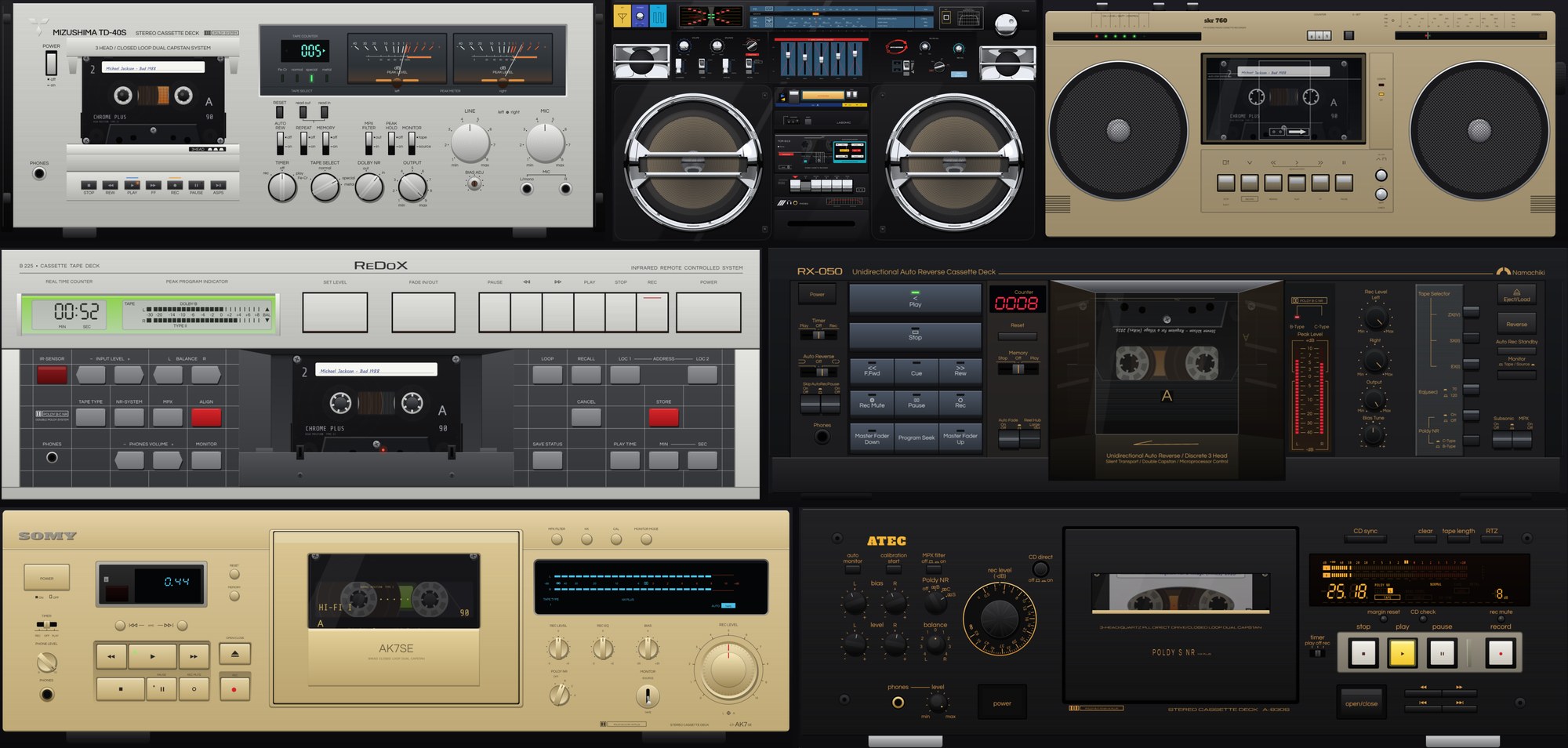
Fomalhaut 1.3.0 is out – with a new mode: Compact Cassette

Your playlist becomes a running cassette: the tracks of the album are laid out on sides A and B, the reels turn with real tape physics, the counter runs and the cassette is turned over at the end of side A.

Video: Fomalhaut 1.3 – Cassette mode and AIMP on YouTube (2 min)

  • Blank cassettes: 21 types from the 70s to the 90s in ten colours each – 210 different cassettes (Space: next type, P: colours)
  • Bought cassettes printed from the album cover: Album Print, Album Tracklist, Album Tint and Album Art. In Winamp / WACUP the cover comes from cover.jpg, folder.jpg … next to the track.
  • Seven working tape decks (W: next deck, F: finish, F2: what it can do): play, pause, stop, rewind and fast forward control Winamp / WACUP, the volume and balance knobs follow it, counters, memories and switches work like on the real devices

Also new: Shift + letter steps backwards in all modes, F1 lists the keys of the running mode, and the parts of the scene (flame, wave, display …, deck, finish, counter) can be changed from the right-click menu. Fomalhaut is now also available for AIMP.


Download: vis_fomalhaut-1.3.0.zip on GitHub
SHA-256: a69a4815c35a7594bfb784bdf85c5f7d44ca56ebdba740b402fd53ca780bb095
VirusTotal: https://www.virustotal.com/gui/file/a69a4815c35a7594bfb784bdf85c5f7d44ca56ebdba740b402fd53ca780bb095

Update: replace vis_fomalhaut.dll in the Plugins folder (Winamp/WACUP closed).

In memory of Lou Ottens (1926–2021), inventor of the Compact Cassette.
Pages: [1] 2 3 ... 10